Digital Watercolour Pencils: A Beginner's Guide to Procreate
The Essential Kit for Aspiring Digital Artists
From Social Media Graphics to Brand Identity
So, where does this style truly shine? The applications are surprisingly broad, extending far beyond personal sketchbooks. For entrepreneurs and small business owners, establishing a unique brand identity is crucial. The organic, human touch of watercolour pencil art can make a logo, packaging design, or social media graphic feel more personal and memorable. Imagine a baker’s Instagram feed filled with beautifully rendered illustrations of their pastries, or a wellness coach’s website featuring soft, calming watercolour accents. This creative font style, when applied to illustration, builds an immediate connection with an audience that values authenticity.
For marketers and content creators, this kit is a powerful tool for visual storytelling. In a digital landscape saturated with slick, vector-based graphics, a hand-drawn illustration can stop the scroll. Use it to create engaging infographics, unique blog post headers, or eye-catching email newsletter graphics. The textured, artisanal quality of the Procreate Watercolour Pencil Brush Kit helps content stand out, adding a layer of perceived value and care. It’s perfect for projects that need to feel less corporate and more human, making it an invaluable design asset for anyone in the publishing or blogging space. The style works beautifully for editorial design, adding spot illustrations to articles or creating full-page chapter art.
Mastering Your New Tools: A Practical Workflow
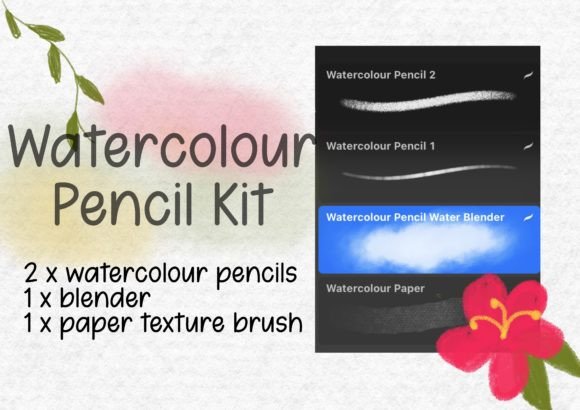
- Watercolour Pencils: You get two distinct pencils. One is a wet pencil that lays down a soft, slightly blended line, perfect for initial sketches or areas where you want a gentler look. The other is a textured pencil, which provides a more defined, gritty stroke that’s excellent for adding detail, texture, and a sense of graphite-like structure to your drawing.
- Water Blender Brush: This is the key to unlocking the watercolour effect. After laying down your pencil strokes, you use this brush to gently "pull" the pigment, creating smooth gradients, soft washes, and beautiful blends. It mimics the way a real wet brush interacts with pencil pigment on paper.
- Watercolour Paper Texture Brush: This final tool adds a crucial layer of realism. By applying this brush to a layer beneath your artwork (and setting it to a blending mode like Multiply), you can instantly give your digital canvas the authentic, slightly rough surface of real watercolour paper, complete with subtle grain and texture.
This simplified approach encourages experimentation. By focusing on just these four tools, you can quickly learn how they interact, developing your own techniques and style. It’s a practical entry point into modern typography and illustration, giving you the confidence to create professional-looking artwork for any project, whether it’s a personal greeting card or a commercial client’s packaging design