Bring Artistic Flair to Digital Lettering with Watercolour Calligraphy
There's a certain warmth and personality in hand-painted lettering that digital fonts often struggle to replicate. The bleed of pigment, the textured stroke, the slight imperfections that give a piece soul—these elements create an emotional connection with the viewer. The Watercolour Calligraphy Procreate Brush captures this essence beautifully, offering a single, versatile tool designed for artists, letterers, and designers who want to infuse their digital work with authentic, handcrafted charm. This isn't just another brush; it's a gateway to a more organic and expressive style of creation.
Understanding the Tool: More Than Just a Brush
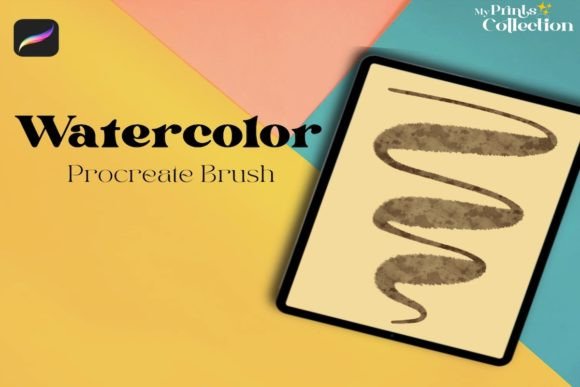
At its core, the Watercolour Calligraphy Procreate Brush is a specialized digital tool engineered for the Procreate app (version 5 or higher). It's delivered as a single .brushset file, meaning you get one meticulously crafted brush designed to emulate the behavior of a watercolour-loaded calligraphy pen. Its visual characteristics are defined by a dynamic, textured edge that responds to the pressure and tilt of your Apple Pencil. Press lightly for a fine, delicate hairline; apply more pressure, and the stroke swells with a rich, granular texture reminiscent of real paint on paper. The "bleed" effect at the edges is subtle and natural, avoiding the overly digital, perfect look that can feel sterile.
The personality of this brush is inherently artistic, organic, and slightly imperfect. It carries a style that leans towards modern calligraphy and hand-lettering, making it ideal for projects that require a human touch. Its appeal lies in its ability to add instant depth and character. Unlike a standard script font, which is static, this brush allows for infinite variation in every stroke, ensuring your work feels one-of-a-kind. For anyone building a brand identity that values authenticity, creativity, and craftsmanship, this tool is a foundational design asset.
Where This Style Shines: Practical Applications
The true value of the Watercolour Calligraphy Procreate Brush is realized in its application. It excels in scenarios where you need to make an emotional impact or convey a sense of bespoke quality. Consider these real-world uses:
- Logo Design & Brand Identity: For boutique businesses, artisanal brands, cafés, wedding planners, or lifestyle bloggers, this brush can create a unique wordmark or supporting typographic elements that feel personal and luxurious. It helps build a brand identity that stands apart from competitors using generic premium fonts.
- Social Media Graphics & Content Creation: In the fast-scrolling world of Instagram or Pinterest, a textured, hand-lettered headline can stop a viewer in their tracks. Use it for quotes, announcements, or story highlights to add a layer of visual interest that static text cannot match.
- Packaging Design: Artisan food products, cosmetics, or handmade goods benefit immensely from this aesthetic. It communicates care, quality, and a small-batch ethos directly through the packaging design.
- Editorial & Publishing: While not for body text, it's perfect for chapter titles, pull quotes, or section headers in magazines, books, or digital publications. It adds a creative focal point within editorial design.
- Personal Projects & Hobbyist Crafting: From designing custom wedding invitations to creating unique art prints or personalized stationery, the brush empowers crafters to produce professional-looking results with a handmade feel.
This style influences visual hierarchy by naturally drawing the eye. A headline set with the Watercolour Calligraphy Procreate Brush will command attention, creating a clear focal point. When used thoughtfully, it enhances audience engagement by making a design feel more approachable and human. The texture and movement in the strokes can evoke specific emotions—whimsy, elegance, rustic charm—directly shaping brand perception.
Making It Work: Integration and Best Practices
Adopting any new creative font or tool requires a strategic approach. Here’s how to integrate this brush effectively into your workflow.
Evaluate Project Fit: First, ask if the project calls for an organic, artistic touch. The Watercolour Calligraphy Procreate Brush is a display font tool—its strength is in headlines and short phrases, not long paragraphs. It pairs wonderfully with clean, neutral typefaces. Try combining it with a simple sans serif font for body copy or a classic serif font for a sophisticated contrast. This practice of font pairing creates balance and ensures readability.
Test Thoroughly: Before committing to a final design, create test compositions. Experiment with different color palettes—watercolour effects look stunning in muted, earthy tones or vibrant, saturated hues. Check how the lettering looks at various sizes. Does the texture hold up when scaled down for a business card? Does it remain impactful as a large website header?
Understand the License: Since this is a commercial font tool delivered as a brush, verify the licensing terms. Typically, brushes like this are licensed for commercial use in your end designs (like a logo or a product), but you cannot resell the brush file itself. This is a critical step for any professional or small business owner using it for client work.
Leverage the Medium: The fact that this is a Procreate-specific tool is a strength. Use the app's layers, blending modes, and color adjustment tools to enhance the effect. You can layer textures, add watercolour washes in the background, or use the eraser with a soft brush to create even more organic edges. This level of control is something a static handwritten font file cannot offer.
Ultimately, the Watercolour Calligraphy Procreate Brush is more than a shortcut to a trendy look. It's a versatile instrument for designers, marketers, and creators who understand that in a digital landscape, the most memorable and engaging work often carries the mark of a human hand. By focusing on its strengths—expressiveness, texture, and emotional resonance—and applying it with strategic consideration for context and pairing, you can elevate your projects from merely informative to truly captivating.